Monday, January 17, 2011

Nokia Qt licensing (getting started on Windows 7 using Visual C++ 2008 Express edition)

( Addendum: Thanks to Gordon, New Zealand for pointing out that the recipe below won't work for 64-bit Windows 7 host - I had a 32-bit system. There, it seems, one must compile Qt from source. Check this out for assistance: Troubleshooting Visual Studio 2010 and Qt 4.7 integration )

Software should be simple. Software licensing should be simple. Software development should be simple.

Yeah, right.

Qt is a wonderful development tool from Trolltech and nowadays Nokia. But it seems to me they are doing their best to make starting using it difficult (I call this Symbian syndrome, it seems to be contagious).

About the Qt licensing

On their licensing page Nokia/Qt tries their best to make you feel like the commercial license really is what you need. Nope.

LGPL is what you need - also for development and sales of commercial software. Only if you must change the internals of Qt itself (who would?) and do not want to share those changes (why?) you should grab the commercial. At least I don't see any other reason. So - ignore the FUD and grab the LGPL.

Which download?

This is what turned me down on Symbian, years back. Fragmentation. So many packages that one cannot really know, which one to download.

Arguably, Qt is difficult for the packager. Some ten platforms. Different compilers. Cross compiling. But they indeed could be making it simpler.

This is the one you want (qt-win-opensource-4.7.1-vs2008.exe), for Windows 7 native development using the free Visual C++ 2008 Express edition (also the newer 2010 Express might work but I haven't tried).

Inconsistency warning

Nokia is saying that only gcc compiler is officially supported by the opensource installation package. This may be so but the free Visual C++ 2008 Express compiler works just splendidly. You really want to rather use the Microsoft compiler, since this means no need to install MingW and that stuff. In my opinion, Nokia/Qt could simply state the fact and "support" the Express compilers. Why not?

The opensource installer seems to be meant for both LGPL and GPL 3.0 licensing. So it implies when you start it. However, the click-through license being shown is only LGPL. This is a beauty spot - if I were Nokia/Qt, I'd call the package LGPL (instead of opensource) and simply keep the GPL 3.0 for the "generic all sources" package. Don't complicate things. No-one developing for Windows and with Visual C++ 2008 will use GPL, anyways. Give less blurry options. Be consistent.

Installation

These instructions are based on this, but updated.

1. Install Visual C++ 2008 Express (or 2010 Express)

Note: Though it is free, the Express version requires registration within the first 30 days. You must have a "Windows Live ID" for doing this.

2. Install the 'opensource' Qt 4.7.1 package

Installation is a breeze and now it seems problems are behind us. Run the demos at the end of the installation - they give a good picture of what Qt can do.

3. Creating your own project

( Now, I'm not sure if all this works right after installation. If not, do the next step - configure and compile Qt - first. )

Add the Qt binaries folder to the PATH unless it's already there (wasn't for me - why wouldn't the installer have done this?)

    Start > Control panel > search: environment > Edit account's environment variables (or something like that)

PATH C:\Qt\4.7.1\bin


Open a "Visual Studio 2008 Command Prompt" ( Start > Programs > ... > Visual Studio Tools > ... ). This is normal Windows command prompt with some environment variables set so one can compile stuff (see with 'set' command).

Create an empty folder (MyDemo) and a source file (main.cpp) in it:

   mkdir MyDemo
cd MyDemo
( create main.cpp with a text editor, see contents i.e. from here )
qmake -project
qmake


Compile

   nmake


Run

   cd debug
MyDemo.exe


Success? If not, give a comment on this blog.

4. Configuring and recompiling Qt itself

Open the "Visual Studio 2008 Command Prompt"

   C:
cd \Qt\4.7.1
configure --help


That shows all the different configuration options.

Try something like this (all in one line):

   configure 
-no-accessibility
-no-qt3support
-no-opengl
-no-openvg
-platform win32-msvc2008 
-no-gif
-no-libtiff
-no-dbus
-no-phonon
-no-phonon-backend
-no-webkit
-no-script
-no-scripttools
-no-declarative
-no-style-motif -no-style-cde
-sse2


configure will ask you for the license. Confirm open source by 'y'.

Running configure took around 20 minutes. Make some coffee...

   nmake


Running nmake took around 2 hours. Watch some tv...

To clear an earlier configuration:

   nmake confclean


What about Qt Creator?

The above installation brings the command line tools and the Qt Designer (the UI editing tool) to your usage.

It does not, however, bring an IDE.

Qt Creator is an IDE for Qt. The current name of the Windows installer is qt-creator-win-opensource-2.0.1.exe. Download.

Another IDE option is to integrate Qt development with Visual C++, using that as the IDE. This is done using the Qt Visual Studio Add-in (qt-vs-addin-1.1.7.exe). Visual C++ 2008 Express does not support add-ins, however, which leaves us either to work on the command prompt (quite fine) or use Qt Creator.

Note: You can uncheck the "MinGW runtime development tools" option when installing Qt Creator (since we're not using MinGW).


Note: If using Qt Creator with projects on network drives (or i.e. shared host disk of VMWare as I do), use drive letter mappings (s.a. G:) instead of the long path names (s.a. \\vmware-host\Shared Folders\...). It may be the space in the path name or it may be the \\ style but I didn't get projects to run that way. Drive mapping helps (create those in main level of 'Computer' view of the Windows file manager).


Debugging with Qt Creator

Qt Creator needs a CDB console debugger in order to allow you to single step and debug your code. This is a separate download from Microsoft, under the name Debugging Tools for Windows. The actual installer is named winsdk_web.exe (Windows 7 SDK etc.).

You only need to have the "Debugging Tools for Window" option checked in the above installer. It may give some warnings about only having the "client" parts of .NET something 4 installed. This is okay, proceed.

Once the stuff is installed, restart Qt Creator and it should now be able to debug (add a breakpoint, try single step, look for variable values). Voila!

( It does say about "Debug helper" not being rightly set up or needing a new compile. Maybe, if we had started with CDB being there Qt would have gotten all the stuff right. Or maybe it's something else. Anyways, it seems Debug helper is not so valuable. We can still see the contents of all regular C++ constructs just fine. )

Finally there

It shouldn't be this hard.

But now that Qt and all the pieces are in place, Qt Creator is actually feeling like a very nice IDE. And Qt itself is awsome, that I know anyways (otherwise I might have lost hope in the midst of this). The official response of Qt people would surely be "either use MinGW or get the real Visual C++ software (and use the plugin)." Well, I don't want to. I have good experience of using VC++ Express versions and see no reason they shouldn't/couldn't be supported by Qt.

What Nokia/Qt could do, in my opinion, is to make a dynamic webpage (using JavaScript and CSS) that takes one through the whole installation routine, on a one single page. The page would have road junctions along it, asking you for something (s.a. which environment you want to build on and what to target, what compiler to use, license etc.) But all this would happen on the one single page. Then at the end you would get a list of *all* required downloads in the order they should be installed. That would be dead easy (both for them and for the page visitors). Now they seem to be going for "one package installs all" (most likely because managers prefer that way). This is not necessarily best for developers, since we want to have each thing only once, and understand how the parts fit together.

To get a feel of what the current situation is, look here:

At footer of all the tabs:
- 4 Qt Creator binaries links
- 1 Qt Creator source link
- 1 Visual Studio Add-in link
- 1 Nokia SDK link

LGPL tab:
- 5 "Complete development environment" links
- 7 "Qt libraries" links

Commercial tab:
- no links (just forms)

That page is the main cause of the headache. Don't use tabs on it - make the flow from up to down. Way less information-like links, or make them visually separate from the download links. USABILITY, PLEASE!

None of this is clearly expressed on the Nokia/Qt website, leading to unnecessary downloads and time lost trying to figure out what works and what does not. This is why this blog entry was created.

Wednesday, December 15, 2010

Olinpa tänään vallankumouksessa

( This is about a Transportrevolution kick-off event arranged by Sitra. )

Sitra järjesti eilen Liikennerevoluutio-hankkeen käynnistystapahtuman, johon sain onnekkaasti kutsuttua itseni mukaan. Tässä pieni kooste siitä, mistä tuolla puhuttiin ja millainen "fiilis" hommasta jäi mieleen.

Pääkohdat

Hankkeen taustana on Sitran huoli siitä, miten "siiloutuneita" suomalaisen yhteiskunnan päättäjä- ja infrastruktuurin suunnittelutahot ovat. Tiet. Radat. Väylät. Käyttäjä eli matkustaja on kakkosluokassa ja ottaa vastaan, mitä poliitikot ja toimittajat onnistuvat tekemään. Ja koko homma maksaa.

Liikennerevoluutio pyrkii muuttamaan tämän. Se haluaa asioita katsottavan kokonaisuutena, tehtävän edullisemmin ja käyttäjän ehdoilla. Toimivaa, vähemmällä rahalla. Ja tietenkin myös niin, että samalla vähennetään ilmastokuormitusta.

Tuossa nuo pääkohdat lienevätkin (jos olet kiireinen poliitikko tai ministeri, voit lopettaa lukemisen tähän). Yhteistyö. Matkustaja. Edullisuus. Ilmasto. Siinä se.

Kabinettivallankumous

Kabinettivallankumous tämä on siksi, että se lähtee aika lailla piirien itsensä sisältä, tosin Sitran näyttävästä ulkopuolisesta aloitteesta.

Homman alustamiseen on Sitra valinnut 25 viisasta miestä (ja naista), jotka huhtikuuhun mennessä työpajoissaan tarkentavat, miten tämä ajattelutavan muutos Suomen liikennepolitiikassa ja käytännössä saadaan aikaan. Kuulemma porukka on tosi osaavaa, mutta miten hyvin ala itse osaa muokata itsensä uudelleen? Saamme nähdä.

Radoista palveluun

Yksi tilaisuuden sanomasta oli fokuksen siirtäminen radoista palveluun. Vanha virsi.. mutta tosi. Ratojen ongelmana on se, että nykyisin tarpeet muuttuvat nopeasti. Itse en oikein koskaan ymmärtänyt Turku-Helsinki -moottoritien tarvetta (vai pitäisikö sanoa Salo-Helsinki). Ehkä se jää oman aikakautensa viimeisiksi lippulaivatuotteeksi. On vaikea nähdä, että vastaaviin hankkeisiin löytyisi jatkossa rahaa tai päättäjiltä halua. (no, tämä on omaa mietintääni, tilaisuudessa yksittäisiin hankkeisiin ei viisaasti viitattu)

Puheenvuoroja

Porukka Korjaamolla oli aika vaikutusvaltaista. Ministeriä ja toimitusjohtajaa. Tässä kooste kommenteista, jotka kirjasin ylös.

Ministeri Vehviläinen oli juuri saapunut Pietarista ja koetti vääntää vitsiä vallankumouksesta. Aika jäykältä puhekoneelta vaikutti.. Mainitsi, että uusia Allegro-junia on suunniteltu 16 vuotta. Mikäli projektien aikajänne on jatkossakin tällainen, ei vallankumous taida ennättää ajoissa (oma mietelmäni). Oikeasti, me tarvitsemme infrastruktuurin muokkaamiseen työkaluja, joilla hankkeet saadaan käyttöön ehkä 4 vuodessa. Kiina taitaa jo nykyisellään toimia noin. Muuta Vehviläisen kommenteista ei jäänyt mieleen.

Pursiainen: "Hyvä liikennepolitiikka on hyvää ilmastopolitiikkaa - ja päinvastoin."

Pokka: "...selviytymään tulevaisuudessa paremmilla ratkaisuilla ja vähemmillä varoilla."

Sitra: "...ei ole oikein olemassa hankintakäytäntöjä [olosuhteiden muuttamiseen ja palvelutason hankintaan]"

Kosonen: "kyseessä on systeeminen muutos, ainakin seuraavan parin hallituskauden mittainen"

Lisättävää?

Hienoa olla mukana vallankumouksessa, etenkin kun tarjoilu pelasi oikein hyvin. :)

Se, mitä jäi ikävä on "crowdsourcing" ja kansalaisaloitteiden mukaan ottaminen. 25 viisaan joukossa pitäisi olla enemmänkin kuin yksi alle 30-vuotias opiskelija.

Lisäksi järjestelmien sietokyky (resilience) sää- ja muille ääri-ilmiöille tulee olla nykyistä parempi. Etenkin kun/jos aletaan käyttää enemmän tietotekniikkaa kuin nyt.

Muuten - ei kun täyttä vauhtia eteen. Ei aikailla. Ilmasto lämpenee ja pian kiinalaiset tekee meidänkin infran, ellemme ala itse tehdä parempaa, nopeammin ja halvemmalla. Voitettiin me 1995 jääkiekon maailmanmestaruuskin - kaikki on edelleen mahdollista.


Tietoa hankkeesta muualla netissä:

- Sitran sivuilla
- ...

Monday, August 30, 2010

The difficulty of Web design

We've been crafting the www.bmdesign.fi website for around two months, now. Wow!

It's now in the third (and final) iteration and will be released in a week.

While I'm personally to be blamed for most of the delay, there's something deeper in the process to learn from. And something that applies to wider field than mere web design. Let's see...

To get the design "right" one has at least three areas to consider.

1. Layout
2. Contents
3. Visual look

Now, the challenge is these really do tie together. What if you don't know any of them at first? Where to begin?

Writing the "stuff" (contents) is a valid start, but it easily becomes a book, not a website. Starting with layout without much of a clue on the contents is equally a bad idea. The end result will be one of the many websites looking *exactly* alike. Side bar. Pulldown menus. Boooooring.

Visual look. We kind of did start with this. Still, it only gives colors and maybe fonts. It needs layout and contents to make sense.

So essentially we have a mutual dependency between all of these and therefore must develop them together, iteratively.

In the first (and second) iterations we were trying to make a simply layout. I didn't want menu levels. I wanted something where one does not get lost; a site that you know you've fully covered. That's cool with videos, btw. They have a start and an end. Unless you're into the "extras" you know that you've seen a movie. Not so with websites (usually).

We had a banner header. Everyone has, right. Iteration 3 doesn't. It looks more like the Chrome browser. But see for yourself.

What I intended to write on the blog is that the same dilemma is there also in city/transport/building design. City is the layout. Transport is the contents (what fills the streets). Buildings are the visual. It's difficult or impossible to plan only one of these, without hindsight to the other two.

Wednesday, July 28, 2010

Light Peak in embedded systems

Light Peak is Intel's new optical interconnect system, using on-chip laser/receivers (up to 30x cheaper than existing laser technology, they say, and smaller). It's coming out at the end of the year (2010). It works.

Now, what is surprising is that there seems to be _absolutely_ no buzz about this in the embedded world. Why? Isn't this a perfect technology.

- optical so no ground loops and/or electromagnetic disturbance
- good latency (I believe, did not find figures)
- multiple protocols running simultaneously (and quality-of-service handling)
- up to 100m cabling distance without repeaters

We'll be using this for a PRT system's internal communications.


Here's a collection of the best links I found:

http://www.youtube.com/watch?v=nfGevFIVKw4&feature=PlayList&p=AB0C057729CF58E0&playnext=1&index=45

http://www.osnews.com/story/23247/Intel_Shows_off_First_Light_Peak_Laptop

http://www.pcpro.co.uk/blogs/2010/06/30/light-peaks-dazzling-potential/

http://www.intel.com/pressroom/archive/releases/2010/20100727comp_sm.htm

http://techresearch.intel.com/UserFiles/en-us/File/OpticalIO/LightPeakInterestingFacts-v010710.pdf

Sunday, July 11, 2010

OS X 10.7 UI idea: stacks on the desktop

I've sent some suggestions to Apple earlier, and they actually replied with "please don't send us suggestions" email. They are afraid of getting sued later, I guess.

Anyways, people should be able to give feedback and ideas of UI design. Hey, Microsoft proudly says they did this in making Windows 7 so good (which it is). SO, here goes Apple.

STACKS ON THE DESKTOP

The desktop is a perfect place to clutter your life. Position keeps different kinds of things apart - upper left corner for handy links etc. - left edge for to-be-done business things. Right edge for personals. Center for ASAP stuff.

Only, there's often more stuff than necessary when living this way. What is the way in OS X to hide such stuff, yet keep it "there". Stacks. :)

But stacks only exist in the Dock. So I'm supposed to place all my categories of stuff in different stacks in the same positional place. I'm losing something of the desktop arrangement, here.

So, make it possible to have stacks everywhere. Actually, make it possible to show a directory as a stack and that's it. This way, also command line usage would work fine.

Why not simply place folders on the desktop? It simply feels more elaborate. It opens new windows when the stuff is accessed. Don't like that.

If you know of an existing OS X tool that already provides "stack everywhere", pls. let me know.

Tuesday, July 6, 2010

Keeping a mouse alive...

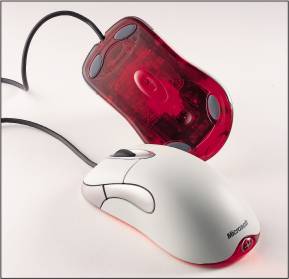
Are you one of those people - like me - who just finds it irritating when things seize to work. This writing is about my Microsoft "Intellimouse Optical" (nothing much intelligent about it, though).

It's a good old wired mouse that I originally bought to my first Mac. Somewhere like 2002. It's still working, but the roll of it started getting stuck a year back or so. It's irritating; the symptoms are that the roll rolls.... then not... then again. Like there was some place alongside it that's sticky. This of course is quite an annoyance for using it on websites or anywhere.

Now. What's interesting about this is that *nothing's wrong*. I've analyzed the glitch and I suspect all Intellimice of this age would be affected. Here's what.

The roll is too close to the right edge. If one moves it slightly left (it has a gap of around 0.5mm) all is fine. So - I opened the mouse and made the case opening bigger. About 20 times. What's funky about this is that in order to feel if the cure is enough one has to put back the screws and all. :) Before that, it was always okay. After tightening the screws, not so. :)

So, here's the advice if your mouse has the same glitch:

- case opens by detaching the lower glued pads only. Below them are two screws.
- try scraping some off the right side of the mouse wheel first. Doing this would have no visual effect on the mouse, if this is enough, be happy.
- scrape the mouse opening from "outside in" to keep visual effects minimized. I had to remove rather much until it finally worked. But I wasn't having this guide. ;P
- once the cover is back on (but not the pads) try to "free wheel" the wheel. It should give a high pitch and roll a few rounds. It should feel light.
- don't tighten the screws too much. You can even leave them loose. Tightening makes the problem worse.

Naturally, instead of doing all this one could just go and get the latest Apple Magic Mouse. But it feels good to have old stuff working, and it feels good to be able to fix things.

p.s. If you know how to make the right extra button (mouse button 5) do "Exposé - show desktop" I'd be pleased. Running OS X 10.6, Microsoft Intellipoint 7.1.0. It just does not work (tried both assigning at Intellipoint and 'Handled by Mac OS'); used to about a year ago. Maybe an OS X update has killed that?

Saturday, April 3, 2010

Blogging from Transtec 2010 Delhi

The upcoming week I'll be in Delhi, exposing the BM Design PRT project at a speech.

I'll be blogging from the event, which is about sustainable transport in developing countries.

http://www.ewebevolution.com/transtec/

Cont'd: I wrote some remarks on the individual presentations but haven't typed them in, yet.

Some of the pictures I took are available in Flickr.

My own presentation slides are also online.

Now, need to pack & fly. :)